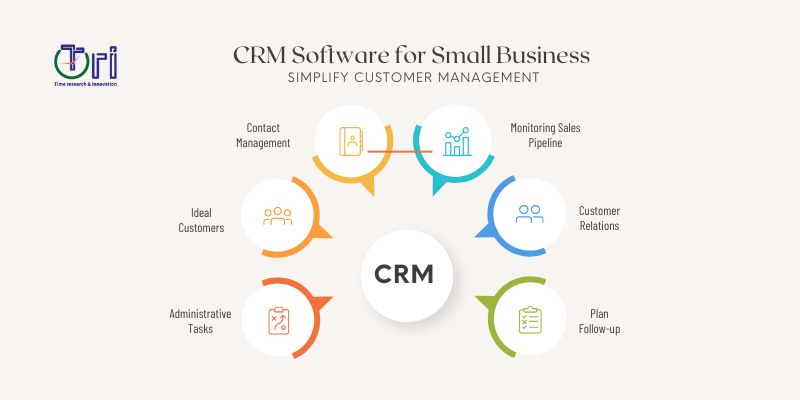
CRM Software for Small Business: Simplify Customer Management


CRM Software for Small Business helps growing companies organise customer data, manage leads, improve follow-ups, and build stronger relationships. Instead of keeping information across spreadsheets, emails, and notebooks, businesses can manage customer details in one place. A good customer relationship management system can also support sales, marketing, customer service, and business growth. For small teams, this can save time and make daily work much easier.
Timerni helps businesses choose and build technology solutions that match their goals, workflows, and future growth.
What Is CRM Software?
CRM stands for Customer Relationship Management. CRM software is a digital platform that enables businesses to store, organize and manage information about current and potential customers. It can store information like names, contact details, conversations, purchases, inquiries and sales activities all in one central location.
It helps teams to understand customers and to offer better service. Rather than searching different systems employes can quickly find the information they need.
Why Small Businesses Need a CRM
Small businesses often have limited staff and resources, so every hour matters. As the number of customers grows, managing relationships manually can become difficult. Important follow-ups may be forgotten, customer information can become scattered, and sales opportunities may be missed.
A CRM system brings these activities together and gives teams a clearer view of their customers. This allows small businesses to work in a more organised way without adding unnecessary complexity.
CRM Software for Small Business: Key Benefits
A CRM can support several parts of a small business. It is not only a tool for sales teams because marketing and customer service teams can also use the same customer information. When everyone works from one system, communication becomes easier and tasks are less likely to be missed.
Key benefits include:
- Centralised customer information
- Better lead management
- Easier sales tracking
- Faster customer follow-ups
- Improved team collaboration
- Automated routine tasks
- Better customer service
- Clearer business reports
These benefits can help small businesses build stronger customer relationships while making daily operations more efficient.
How CRM Helps Manage Customer Data
Storing customer information in many different locations makes it hard to maintain. One employee may have customer data in email conversations and another may have information in a spreadsheet. A CRM will bring this information together in one organised system.
All information is available in one place for employees – history of the customers, conversations, sales activities and more. This gives a clearer picture of each customer and helps teams provide more relevant service.
How CRM Improves Sales Management
A CRM can make the sales process easier to understand and manage. Sales teams can track new leads, monitor conversations, schedule follow-ups, and see which opportunities are moving forward. Managers can also view the sales pipeline and identify areas that need attention.
Automated reminders can help salespeople remember important tasks and prevent leads from being forgotten. With better visibility, teams can focus their time on opportunities that are most likely to become customers.
CRM Automation for Small Business
Automation is one of the most useful features of modern CRMs. Small teams tend to waste a lot of time on repetitive, manual tasks such as emailing, record updates and reminders. Many of these tasks can be automated using CRM automation, but still allow the employees to remain in control of the critical decisions.
For example, a CRM can:
- Send an automatic welcome email when a new lead arrives.
- Create follow-up reminders for sales representatives.
- Move leads between different sales stages.
- Notify employees when a customer submits an enquiry.
- Generate regular sales reports.
- Update customer records after specific actions.
By reducing manual work, automation gives employees more time to focus on customers and revenue-generating activities.
How CRM Improves Customer Service
Good customer service is about providing the right information at the right time. When a customer contacts a business, employees need to know their history and current needs. A CRM can access this information quickly so that support teams can respond with more confidence. Customer conversations, service requests, purchases and notes can be kept together. This creates a better experience and makes customers feel like the business gets them.
Choosing the Right CRM Software for Small Business
There are many CRM solutions available, but not every system is suitable for every company. Small businesses should choose software based on their actual needs rather than selecting a system simply because it has many features. The CRM should be easy for employees to understand and flexible enough to support future growth.
Businesses should also consider integration with their existing tools, data security, automation features, reporting, and support. A simple system that the team actually uses can be more valuable than a complicated platform with features nobody needs.
Important CRM Features to Look For
The right features depend on the business and its goals. However, several features can make a CRM especially useful for growing companies. Contact management should allow teams to organise customer information easily. Sales pipeline tools can help employees track opportunities from the first enquiry to the final sale. Reporting and analytics can help business owners understand sales performance and customer activity. Integration with email, websites, marketing tools, and other business software can also reduce duplicated work.
Other useful features may include:
- Lead management
- Task and calendar management
- Email integration
- Customer communication history
- Sales forecasting
- Reporting dashboards
- Workflow automation
- Mobile access
- Third-party integrations
The best CRM is one that supports the way your business actually works.
Common CRM Mistakes Small Businesses Should Avoid
Just because you have CRM software doesn’t mean you’re managing customers better. Businesses need to use the system correctly and ensure that employees understand how it functions. It’s a common mistake to include too many unnecessary fields or processes that can make the system difficult to use.
Another mistake is failing to keep customer data accurate and current. Before selecting software, businesses should consider integration, scalability, and employee needs. These problems can be avoided with a clear implementation plan.
How to Implement a CRM Successfully
To effectively implement a CRM system, start with understanding the business process. First, get a handle on how customer information is currently gathered, stored, and used. Then identify what problems the CRM should solve, and what features it should have. The customer data can then be sorted and migrated to the new system and staff can be trained adequately. After launch, the business needs to monitor usage and iterate based on real feedback.
A simple implementation process includes:
- Identify: Understand current customer management problems.
- Plan: Define CRM goals and required features.
- Configure: Set up fields, workflows, users, and permissions.
- Integrate: Connect the CRM with relevant business tools.
- Train: Teach employees how to use the system effectively.
- Launch: Start using the CRM with a clear process.
- Improve: Review performance and optimise the system regularly.
CRM and Business Growth
As a business grows larger, a CRM becomes more valuable. More customers typically means more inquiries, more sales activities, more support requests and more data. These things can quickly become difficult to manage without an organized system.
A CRM provides a framework for businesses to cope with increasing customer activity without being completely reliant on manual processes. It can also provide owners with valuable insight to make smarter decisions about sales, marketing and customer retention.
Why Choose Timerni for CRM Solutions?
Choosing and implementing the right CRM can be challenging when a business has different systems, workflows, and customer needs. Timerni takes a tailored approach by first understanding the organisation's goals and current processes. The team can help businesses with CRM solutions, software development, automation, integrations, and wider digital transformation needs.
Instead of forcing a business into a generic workflow, the focus is on creating technology that supports how the organisation operates. This can help businesses build a more connected and efficient customer management system.
Industries That Can Benefit from CRM
CRM technology is useful in many industries. It can be used by retail companies to keep track of customers’ profiles and sales activities. Professional service firms can monitor inquiries, projects and client communications. Real estate businesses can handle property leads and follow-ups. Education providers can manage student inquiries and communications.
Healthcare, financial services, technology companies, eCommerce businesses and startups can also use CRM systems to better internal processes and customer relationships.
Final Thoughts
Customer relationships are at the centre of every growing business. The right CRM can help small companies organise customer data, improve sales management, automate repetitive tasks, and deliver better service. It also gives teams a clearer understanding of customers and creates a stronger foundation for future growth. The key is to choose a system that is simple enough to use today while flexible enough to support tomorrow's needs.
Timerni can help businesses explore CRM, automation, custom software, and technology integration solutions designed around their specific requirements. Whether you need a simple CRM setup or a more connected business management system, the right technology can make customer management easier and more efficient. If you are ready to improve how your business manages customers, book a call with Timerni to explore the right CRM strategy for your business.
Frequently Asked Questions (FAQs)
1. What is CRM software?
CRM software is a system that helps businesses organise customer information, manage leads, track sales, and improve customer relationships.
2. Why do small businesses need CRM software?
It helps small businesses organise customer data, manage follow-ups, improve sales processes, and provide better customer service.
3. Can CRM software automate tasks?
Yes. Many CRM systems can automate reminders, emails, lead assignments, notifications, reports, and other repetitive tasks.
4. Is CRM software difficult to use?
It depends on the platform. A well-designed CRM should be simple to learn and match the team's existing business processes.
5. Can CRM software integrate with other tools?
Yes. Many CRM systems can connect with websites, email platforms, marketing tools, accounting software, customer support systems, and other business applications.
6. Why choose Timerni for CRM solutions?
Timerni provides tailored CRM, automation, software development, and integration solutions designed to support specific business goals and workflows.





0 Comment